
A little care for your Android

Less clutter.
More life.

Make room for your next favorite moment. Clean up unwanted files, organize your photos, and get to know your phone a little better.

Free to download. Simple to get started.

A pearl-white cleaning brush with an emerald handle, surrounded by a glass orbit and floating photo cards
Made for Android Review before you clean On-device file cleaning

Less to sort. More to enjoy.

Small cleanups.
Space for bigger things.

Your photos, downloads, and everyday files add up.
Bring a little order back to your phone.

A fresh start
for your storage.

Find unnecessary files and review larger items. Choose what can go, and make room for what comes next.

Files to review
Download.zipDownload
Old clip.mp4Video
Document.pdfDocument
Illustrative files

Keep the moment.
Clear the repeats.

Compare duplicate and similar photos. Give your favorite shot the space it deserves.

Alpine lake and mountains, the sample photo to keepKeep this one

Big videos.
Better perspective.

Spot space-hungry videos and decide which ones are worth keeping.

Screenshots
worth a second look.

Find those saved-for-later moments and clear the ones you’re done with.

A calmer
notification space.

Bring everyday notification clutter into a clearer, more manageable view.

Available features and cleanup results vary by device, Android version, permissions, and settings.

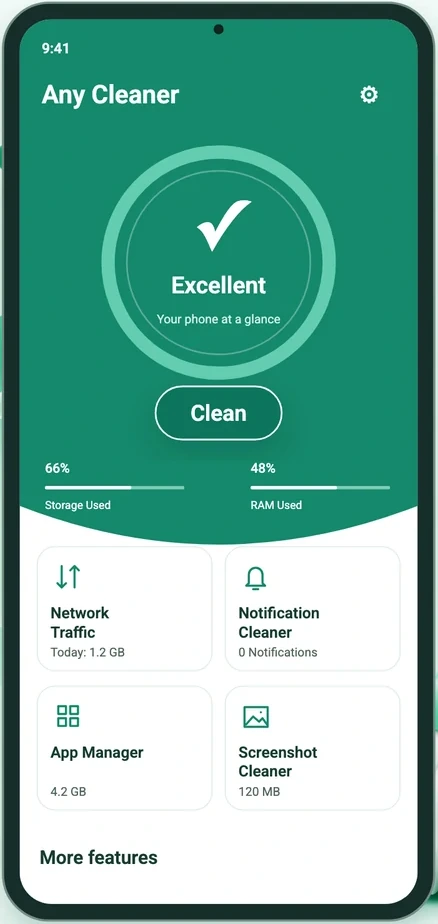
Official Any Cleaner dashboard showing storage, RAM usage and shortcuts to everyday toolsApp preview

Know your everyday companion

Your phone.
At a glance.

A useful check-in, whenever you need one. Explore your phone’s status through a friendly dashboard that brings the details together.

Battery information

Check your battery details in one clear view.

RAM status

See your phone’s current memory usage.

App management

Review apps and how they use storage.

Network speed test

Get a snapshot of your connection speed.

Device scan

Take a closer look at your device information.

A little routine. A lighter phone.

Goodbye clutter.
Hello, simple.

  1. 1

    Get a clearer picture.

    Open Any Cleaner and explore your storage and device tools. Grant the access needed for the features you choose.

  2. 2

    Choose what matters.

    Review the files, photos, or videos found by a cleanup tool. Keep your favorites and select the items you’re ready to let go.

  3. 3

    Confirm. Then carry on.

    Double-check your selection and confirm the cleanup. Keep a backup of important content before deleting files.

Built around your choices

Your files.
Your call.

Cleaning starts on your device, with access you control and decisions you review.

  • Photos and file contents stay on your device during cleaning.
  • Review your selection before confirming deletion.
  • Manage permissions in Android Settings.

Learn how sign-in, analytics, crash reports, and ads use information in our privacy policy.

Explore your privacy

Good questions

A little clarity
goes a long way.

Get to know Any Cleaner.

Visit the help center
What can Any Cleaner help me clean?

Find junk files, review large files and videos, organize old screenshots, and compare duplicate or similar photos. You choose what to remove after reviewing the available items. The app also offers notification cleanup and useful device status tools.

Can I review files before deleting them?

Yes. Review the files and confirm your cleanup before deletion. Keep a separate backup of important content, because some deletion actions are permanent. The amount of space recovered depends on the items you select and Android’s access restrictions.

Are my photos uploaded during cleaning?

File scanning and cleaning happen on your device. Your photos, videos, file contents, file names and file paths are not uploaded as part of cleaning. Google sign-in, Firebase analytics, crash diagnostics and advertising involve the information described in our Privacy Policy.

Is Any Cleaner free to download?

Any Cleaner is free to download from Google Play and includes advertising. Visit the Google Play listing for current availability and compatibility with your device.

How do I delete my account or request data deletion?

Visit Account & Data Deletion to prepare a request from the email associated with your Any Cleaner account. You can request account closure and associated data deletion, or deletion of particular data. Signing out or uninstalling the app does not delete the account.

Any Cleaner app icon

A clearer phone starts here

Make a little room
for the good stuff.

Meet your everyday Android cleanup companion.

GET IT ON Google Play for Any CleanerFree to download · Contains ads